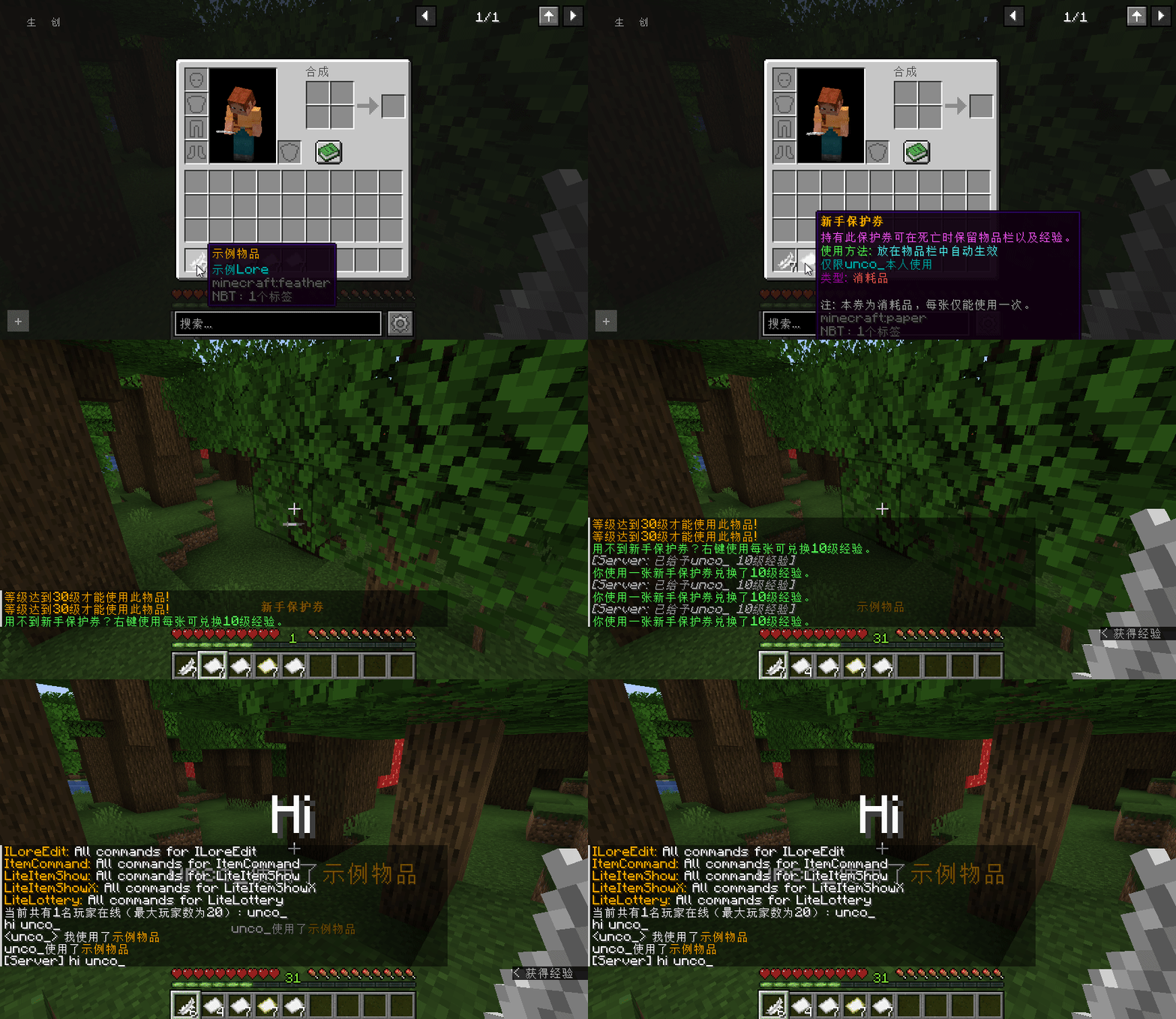
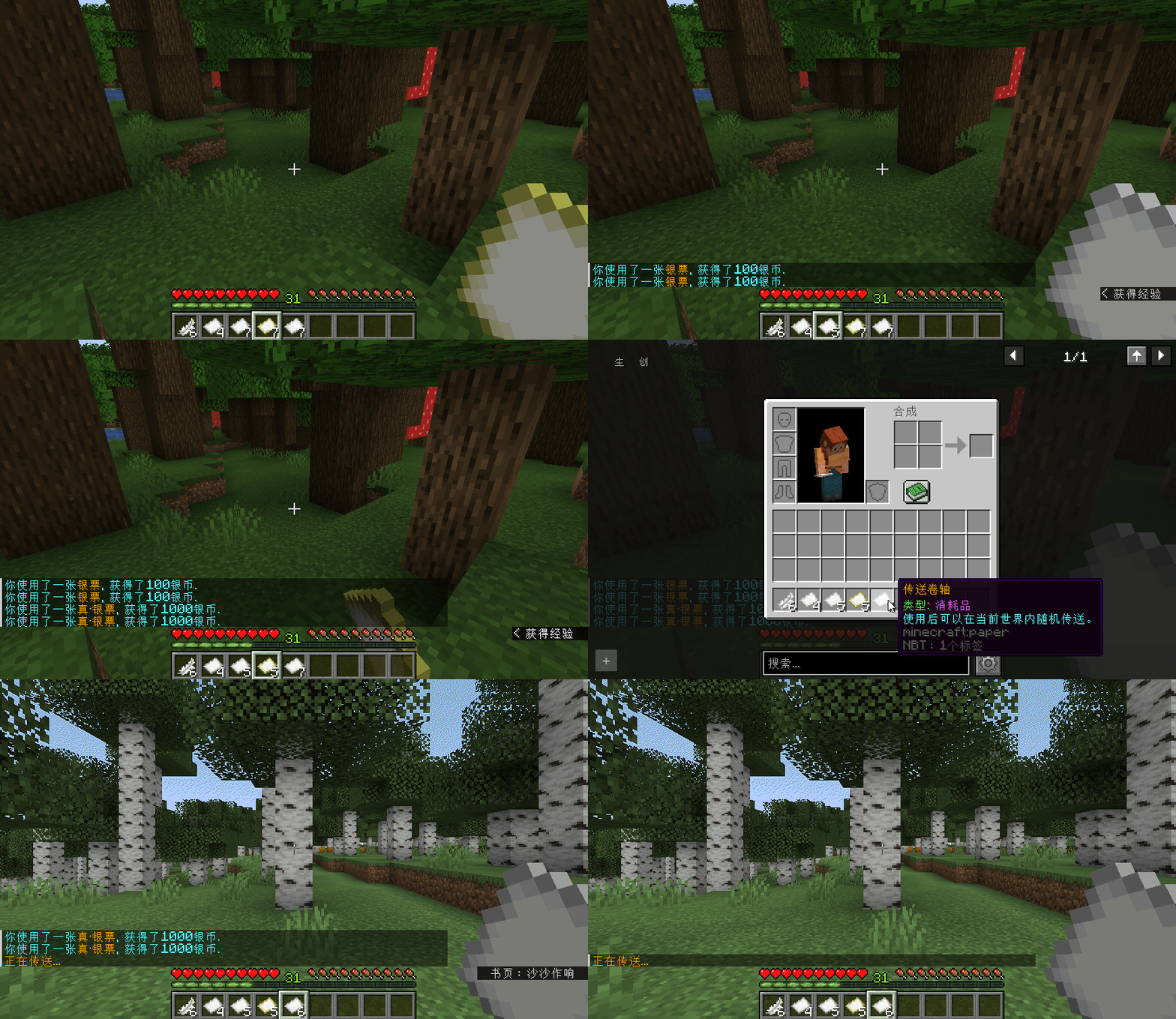
| | 这是一款功能齐全的物品动作插件,可以给任意物品绑定自定义动作。 | 可以用来实现例如称号兑换券、回城卷轴、金票银票、装备被动效果等各种RPG物品、
每日礼包、每周礼包、每年礼包 各种礼包 等等··· 请发挥你的想象。 | | 几乎所有值都能使用变量,插件默认提供{player}变量代表当前玩家,只需安装PAPI即可使用海量变量。 |
|
|
| | 可根据物品显示名/Lore/类型来匹配物品 | | 可自定义物品使用的条件,例如要达到XX级才可以使用、生命值低于XX时可以使用,配合PAPI可实现各种复杂条件,并且支持不满足条件也执行指定的任意动作。 | | 可选择物品动作的触发方式:[主手/副手]左键/右键点击、切换至手持时、物品栏内左键/右键点击、潜行时[主手/副手]左键/右键点击、物品栏内Shift+左键/右键点击, 主手/副手手持/装备时被攻击 | 可以自定义使用物品后执行的动作,例如玩家执行命令、后台执行命令、发送全服公告、发送聊天消息
播放指定音效、发送Title、发送ActionBar、切换BC子服 等等···(支持延时执行和概率执行,详见物品配置文件) | | 可以设置使用物品花费的金钱/点券/经验/饥饿度 | | 可以设置使用物品需要的权限 | | 可以设置需要消耗多少个物品才能使用 | | 可以设置使用物品的冷却时间(每个物品单独计算) | 在物品配置文件中详细讲解了插件功能,此处不再赘述,详细说明请看示例物品配置
(不要看着字多就认为复杂··· 主要都是注释,用不到的功能完全可以忽略,一点也不复杂,真的!)另外配置文件中的音效和命令都是根据高版本写的,
所以在低版本中会提示音效不存在和命令执行错误是正常情况,修改成低版本对应的音效和命令即可 |
|
|
|
| | 命令列表: | /ItemCommand add —— 将手中的物品添加到物品配置文件详细用法: /ItemCommand add [物品ID]
[] = 可选参数 如果不提供参数,默认物品ID为当前时间戳
添加物品到配置文件时默认带有全部选项, 对于不需要的选项直接在配置文件中删除即可,用到的选项只要修改值就行了。
注意:虽然add命令可以快速将物品添加到配置文件,但在1.18之前的版本会导致配置文件中的注释丢失,
所以请自行决定是使用命令添加还是手动修改配置文件添加。 |
| /ItemCommand give —— 将物品配置文件中定义的物品给予指定玩家详细用法: /ItemCommand give <玩家> <物品ID> [物品数量] [物品类型]
(物品类型参数仅在指定ID的物品配置中未指定物品类型时需要, 默认为石头)
<> = 必填参数 [] = 可选参数 |
| | /ItemCommand list —— 查看已加载物品 | | /ItemCommand reload —— 重载插件配置 | | /ItemCommand type —— 查看物品类型(1.14及以上也可查看自定义模型数据) | | /ItemCommand version —— 查看插件版本 | | 以上/ItemCommand 可以缩写为/ic | | 所有命令不区分大小写、所有命令支持TAB补全 | | 权限列表: | | itemcommand.admin —— 可使用/ItemCommand命令,默认OP拥有 | | itemcommand.cooldown.bypass —— 使用物品无视冷却时间,默认OP拥有(有不少人问我为什么使用物品没有冷却/不会扣钱,请注意看这几个权限) | | itemcommand.price.free —— 使用物品无需花费金钱,默认OP拥有 | | itemcommand.points.free —— 使用物品无需花费点券,默认OP拥有 | | itemcommand.levels.free —— 使用物品无需花费经验等级,默认OP拥有 | | itemcommand.foodlevel.free —— 使用物品无需花费饥饿度,默认OP拥有 |
|
|
| - #########################################################################################################
- # +---------------------------------------------------------------------------------------------------+ #
- # | 注意:插件生成的 示例物品配置-(版本号).yml 不会被加载读取,目的是方便旧版本升级后查看新版本注释。
- # | 如需编辑物品配置请修改 items.yml 或在本插件的 items 目录下创建 任意.yml 文件。
- # | 插件会从 items.yml 和 items 目录下的所有.yml文件中加载物品配置,文件名随意但物品ID不能重复!
- # +---------------------------------------------------------------------------------------------------+ #
- #########################################################################################################
- #物品ID 用英文单引号括起来 内容随意 不要重复 不要包含 . 和空格
- '001':
- #匹配物品显示名 可选 支持变量 没有此项则不限物品显示名
- name: '§6示例物品'
- #匹配物品Lore 可选 支持变量 没有此项则不限物品Lore
- lore:
- - '§3示例Lore'
- #是否精确匹配物品Lore 可选 没有此项默认为true 表示需要Lore完全一致 false表示不管实际物品有多少行Lore, 只要含有配置里存在的行即可
- #例如在配置中设置:
- #lore:
- # - 'AA'
- # - 'CC'
- #实际物品:
- # - 'AA'
- # - 'BB'
- # - 'CC'
- #如果使用精确匹配(true) 会认为这个物品不符合条件 因为不完全一致
- #如果使用包含匹配(false) 会认为这个物品符合条件 因为包含AA和CC
- lore-exact: true
- #匹配物品类型 可选 没有此项则不限物品类型 (虽然name,lore,type都是可选的,但至少要提供一个)
- #如果你不知道某个物品的类型是什么 可以使用 /ic type 命令查看手持物品的类型
- type: 'PAPER'
- #自定义模型数据 可选 值是数字 仅用作给予物品时自动设置自定义模型数据,不会影响物品匹配 (1.14及以上版本才支持此选项)
- #可以使用 /ic type 命令查看自定义模型数据 如果有则会显示类型和自定义模型数据 没有则只显示类型
- custom-model-data: 0
- #使用物品需要满足的条件 一行一个条件 可选 支持变量 格式为 '类型:表达式,不满足条件时执行的动作(支持的动作详见下面action部分 不指定动作类型默认为tell,不想执行任何动作则只写 类型:表达式)'
- #多个动作用, 分隔, 例如: cmd: 要执行的命令, tell: 要发送的消息 (注意:冒号[:] 逗号[,] 都是英文半角的, 不是中文的 [:][,])
- #另外要注意的是:不要直接在 表达式 或 动作的值 中使用英文逗号(,) 因为逗号(,)是分隔符。但可以使用中文逗号(,) 如果必须要使用英文逗号(例如title动作),请在逗号(,)左边使用转义符 \ 示例:title: Hi\,hi\,10
- #类型有三种: s = 字符串比较 、 d = 十进制数值比较 、 b = 逻辑值比较 (不指定类型默认为逻辑值比较)
- #字符串比较可使用的运算符: =(等于) !=(不等于) ==(忽略大小写等于) !==(忽略大小写不等于) >(大于) >=(大于等于) <(小于) <=(小于等于)
- #数值比较可使用的运算符: =(等于) !=(不等于) >(大于) >=(大于等于) <(小于) <=(小于等于)
- #逻辑值比较可使用的运算符: !(逻辑取反) 可用的逻辑值有true false yes(等于true) no(等于false) 其他字符串=false
- #什么是满足条件? 表达式执行后产生的结果如果为true 则满足条件 如果为false 则不满足条件
- condition:
- #运算符两边必须有空格, !(逻辑取反)除外
- #字符串比较示例 {player}是插件自带的玩家名变量 无需安装PAPI即可使用
- - 's:{player} != notch, tell: §c你的名字是notch 不能使用此物品!'
- - 's:{player} != NOTCH, tell: §c你的名字是NOTCH 不能使用此物品!'
- - 's:{player} !== notch, tell: §c别以为换了大小写我就不认识你了 你还是不能使用此物品!'
- #另外某些PAPI变量可能会返回空(无内容) 如果要比较空字符串 请使用""(两个英文双引号) 例如: 's:%xxx% != ""' 表示需要xxx变量不等于空 注意整个条件要用英文单引号括起来
- #数值比较示例(因为用到了PAPI变量, 所以需要安装PAPI并启用Player扩展才能正常执行)
- - 'd:%player_level% >= 30, tell:§6等级达到30级才能使用此物品!'
- #直接逻辑值示例(因为用到了PAPI变量, 所以需要安装PAPI并启用Player扩展才能正常执行)
- # %player_is_flying% 会返回yes(飞行)或no(未飞行) 由于使用了!运算符进行取反 所以飞行时不能使用 去掉!就是飞行时才能使用了
- - '!%player_is_flying%, tell:§e由于你正在飞行 不能使用此物品。, sound: ENTITY_EXPERIENCE_ORB_PICKUP'
- #触发方式 可同时选择多种触发方式 一行一种 可选 默认为 [right, sneak_right]
- #支持的触发方式有: left(左键点击), right(右键点击), sneak_left(潜行时左键点击), sneak_right(潜行时右键点击), held(切换至手持时),
- # offhand_left(副手左键点击), offhand_right(副手右键点击), sneak_offhand_left(潜行时副手左键点击), sneak_offhand_right(潜行时副手右键点击), [所有副手触发方式仅1.9及以上版本支持]
- # inv_left(物品栏内左键点击), inv_right(物品栏内右键点击), inv_shift_left(物品栏内Shift+左键点击), inv_shift_right(物品栏内Shift+右键点击) [所有物品栏内点击触发方式仅生存模式下有效]
- # hand_hit(主手手持物品时被攻击), offhand_hit(副手手持物品时被攻击), armor_hit(装备在身上时被攻击)
- trigger:
- - 'left'
- - 'right'
- #物品使用后执行的动作 一行一个动作 支持变量 可选 没有此项则不执行任何动作
- #可选的动作有: cmd, op, console, tell, chat, sound, sound-all, broadcast, give-money, give-points,
- # title, title-all, action-bar, action-bar-all, server 不指定默认为cmd
- #格式为 动作: 值 / 执行延时(Tick) / 执行概率[:种子](%)
- #注意:动作后面需要紧跟一个英文冒号 否则无法识别出正确动作会默认为整行都是cmd动作的值
- #执行延时和几率可以不写, 默认为0延时100%执行, 如果要写则使用 / 来分隔, /两边的空格不能少, 第一个/后面是延时 第二个/后面是概率 种子可以忽略, 如果填写请确保是1-999999999999之间的数字. 关于种子的详细用法请看'002'
- action:
- #cmd = 让使用物品的玩家执行命令 命令不需要加 /
- - 'cmd: help'
- #op = 让使用物品的玩家以op身份执行命令 同样不需要加 /
- - 'op: list'
- #console = 让控制台执行命令
- - 'console: say hi {player}'
- #tell = 给使用物品的玩家发送消息
- - 'tell: hi {player}'
- #延时5秒发送消息 TPS=20的情况下 1秒=20Tick 所以5秒写100
- - 'tell: 到5秒了! / 100'
- #有50%的概率发送的消息 虽然不需要延时 但要手动写个0延时 不然只有一个 / 插件并不知道你是想写概率还是延时
- - 'tell: 你很幸运! / 0 / 50'
- #chat = 让使用物品的玩家发送聊天消息
- - 'chat: 我使用了&6示例物品'
- #sound = 给使用物品的玩家播放指定音效
- - 'sound: ENTITY_EXPERIENCE_ORB_PICKUP'
- #sound-all = 给全服玩家播放指定音效
- - 'sound-all: ENTITY_EXPERIENCE_ORB_PICKUP'
- #broadcast = 给全服玩家发送消息(公告)
- - 'broadcast: {player}使用了§6示例物品'
- #give-money = 给予使用物品的玩家指定数量的钱 只能为正整数 使用此功能需要安装Vault以及支持Vault的经济插件
- - 'give-money: 10'
- #give-points = 给予使用物品的玩家指定数量的点券 只能为正整数 使用此功能需要安装PlayerPoints插件
- - 'give-points: 10'
- #title = 给使用物品的玩家发送Title消息 格式 标题,副标题,显示时间(秒) 注意 逗号为英文逗号 1.10及以下版本会无视显示时间 1.8以下版本不支持此动作
- - 'title: HiHiHi,没人看得到我 因为会被覆盖,10'
- #title-all = 给全服玩家发送Title消息 格式同上 注意 新的Title会覆盖没显示完的Title 所以这条Title会覆盖掉上面那一条
- - 'title-all: Hi,{player}使用了§6示例物品,10'
- #action-bar = 给使用物品的玩家发送ActionBar消息 1.8及以下版本不支持此动作 并且使用此动作需要使用Spigot或其衍生服务端 如Paper
- - 'action-bar: hi 没人看得到我'
- #action-bar-all = 给全服玩家发送ActionBar消息 注意 新的ActionBar会覆盖没显示完的ActionBar 所以这条ActionBar会覆盖掉上面那一条
- - 'action-bar-all: {player}使用了§6示例物品'
- #server = 让使用物品的玩家切换到指定的BC子服 如果你不知道这是什么 那么你不需要此功能
- - 'server: login'
- #使用物品需要花费的钱 可选 支持变量 不能为负数
- price: 10
- #使用物品需要花费的点券 可选 支持变量 不能为负数
- points: 10
- #使用物品需要花费的经验等级 可选 支持变量 不能为负数
- levels: 10
- #使用物品需要花费的饥饿度(food level) 可选 支持变量 不能为负数
- food-level: 10
- #使用物品需要的权限 可选 支持变量
- permission: '示例权限'
- #使用物品会消耗的数量 可选 支持变量 不能为负数 物品数量不足不能使用 提供0或没有此项则不消耗物品
- required-amount: 1
- #冷却时间 可选 单位秒 支持小数 支持变量 不能为负数 如果设置了冷却时间 表示使用此物品后必须等待指定的时间后才能再次使用此物品
- cooldown: 10.3
- #冷却组 可选 支持变量 如果设置本项则冷却时间会在相同冷却组内共享 如果不设置本项则每个物品ID单独计算冷却时间
- cooldown-group: 'example'
- #冷却提示消息 可选 支持变量 {0}代表剩余秒数 不设置本项则会使用语言文件中的默认冷却提示消息 如果设置本项则会覆盖语言文件中的默认冷却提示消息
- #如果不想显示任何冷却提示 请将设置本项为 'none' 例如: cooldown-message: 'none'
- cooldown-message: '§4冷却中, 请等待§c{0}§4秒后再使用.'
- #附魔效果 可选 如果为true 则给予物品时自动为物品增加一个隐藏的附魔(耐久I) 使物品出现附魔光效 没有此项默认为false
- enchantment: true
- #一个简单的匹配物品显示名的例子:
- '002':
- #注意 所有用到颜色符号的地方请使用 § 而不是 & (除了chat动作 因为1.19+版本中如果玩家发送的消息包含§ 会因为非法字符而被踢出游戏)
- name: '§6银票'
- action:
- - 'give-money: 100'
- - 'tell: §b你使用了一张§6银票§b, 获得了100银币.'
- #概率执行逻辑简述:使用物品时生成一个1-100的随机数, 如果 随机数 小于等于 执行概率, 则执行动作. 所以决定执行还是不执行的要素是 随机数和执行概率.
- #在指定了种子并且种子相同的情况下, 当次使用物品生成的随机数相同. 下面2个动作的概率相同(都50%)且种子相同(都是1), 所以要么都执行, 要么都不执行.
- #(种子写1只是示例 实际你想写多少就写多少 无论是1 还是5000 还是65498789891 只要种子一样 当次生成的随机数就一样)
- #概率执行 - 种子用法示例:
- - 'tell: §c你很幸运,额外获得1银币. / 0 / 50:1'
- - 'give-money: 1 / 0 / 50:1'
- - 'sound: ENTITY_EXPERIENCE_ORB_PICKUP'
- required-amount: 1
- #一个匹配物品显示名和物品类型的例子:
- '003':
- #注意 这里就不要再用 '§6银票' 这个名称了, 因为上面那个例子只要求物品名称一致并且触发方式都是默认的right+sneak_right 这里再这样写就完全符合上面那个例子的匹配条件了
- #name: '§6银票'
- name: '§6真·银票'
- #类型为纸
- type: 'PAPER'
- action:
- - 'give-money: 1000'
- - 'tell: §b你使用了一张§6真·银票§b, 获得了1000银币.'
- - 'sound: ENTITY_EXPERIENCE_ORB_PICKUP'
- required-amount: 1
- #一个匹配物品显示名和Lore以及物品类型的例子:
- '004':
- name: '§6传送卷轴'
- lore:
- - '§a类型: §d消耗品'
- - '§b使用后可以在当前世界内随机传送。'
- type: 'PAPER'
- action:
- - 'op: tpr'
- - 'sound: ITEM_BOOK_PAGE_TURN'
- required-amount: 1
- #同一种物品不同触发方式执行不同动作的例子(005、006):
- '005':
- name: '§6§l新手保护券'
- lore:
- - '§a使用方法: §b放在物品栏中自动生效'
- - '§3仅限{player}本人使用'
- - '§5类型: §c消耗品'
- - ''
- - '§7注: 本券为消耗品,每张仅能使用一次。'
- type: 'PAPER'
- trigger:
- #手持时触发
- - 'held'
- action:
- - 'tell: §a用不到新手保护券?右键使用每张可兑换10级经验。'
- #虽然006和005的name、lore、type相同,但是触发方式并不重叠,所以不会冲突。
- '006':
- name: '§6§l新手保护券'
- lore:
- - '§a使用方法: §b放在物品栏中自动生效'
- - '§3仅限{player}本人使用'
- - '§5类型: §c消耗品'
- - ''
- - '§7注: 本券为消耗品,每张仅能使用一次。'
- type: 'PAPER'
- trigger:
- #右键点击触发
- - 'right'
- action:
- - 'console: xp add {player} 10 levels'
- - 'tell: §a你使用一张新手保护券兑换了10级经验。'
- - 'sound: ENTITY_EXPERIENCE_ORB_PICKUP'
- required-amount: 1
|
|
|
|
| - #语言文件版本号 请勿修改
- version: 5
- log-prefix: '[ItemCommand] '
- message-prefix: '§8[§3ItemCommand§8] '
- language-version-error: '§c语言文件版本错误: '
- language-version-outdated: '§e当前语言文件版本:§a{0} §c最新版本:§b{1} §6需要更新.'
- language-update-complete: '§a语言文件更新完成!'
- config-version-error: '§c配置文件版本错误: '
- config-version-outdated: '§e当前配置文件版本:§a{0} §c最新版本:§b{1} §6需要更新.'
- config-update-complete: '§a配置文件更新完成!'
- update-found-new-version: '§c发现新版本可用! §b当前版本: {0} §d最新版本: {1}'
- update-major-update: '§e(有大更新)'
- update-download-link: '§a下载地址: '
- update-check-failure: '§e检查更新失败: '
- update-check-exception: '§4检查更新时发生IO异常.'
- load-item-error-not-match: '§4加载 {0} 时出错! name、lore、type 至少需要提供一个, 当前全未提供'
- load-item-error-unknown-type: '§e加载 {0} 时出错! 未知的物品类型: type: {1}'
- load-item-error-not-found-operator: '§e加载条件时出错! 在条件表达式中未找到运算符: {0}'
- load-item-error-unknown-trigger: '§e加载 {0} 时出错! 未知的触发方式: {1}'
- action-execute-error-sound: '§e错误: 无法执行 sound(-all) 动作! 原因: 指定的音效 {0} 不存在'
- action-execute-error-give-money-not-found-economy: '§e未找到经济插件, 无法执行 give-money 动作!'
- action-execute-error-give-money-not-found-economy-tip: '§e请检查是否正确安装Vault插件以及经济提供插件! (如Essentials、CMI、Economy等)'
- action-execute-error-give-money-invalid-value: '§e错误: 无法执行 give-money 动作! 原因: 无效的数字格式: {0}'
- action-execute-error-give-points-not-found-points: '§e未找到点券插件, 无法执行 give-points 动作!'
- action-execute-error-give-points-not-found-points-tip: '§e请检查是否正确安装PlayerPoints插件!'
- action-execute-error-give-points-invalid-value: '§e错误: 无法执行 give-points 动作! 原因: 无效的数字格式: {0}'
- action-execute-error-title-args-error: '§e错误: 无法执行 title(-all) 动作! 原因: 无效的参数格式: {0}'
- action-execute-error-title-not-support: '§e错误: 无法执行 title(-all) 动作! 原因: 当前服务端不支持此操作'
- action-execute-error-title-invalid-time: '§e错误: 无法执行 title(-all) 动作! 原因: 无效的显示时间: {0}'
- action-execute-error-action-bar-not-support: '§e错误: 无法执行 action-bar(-all) 动作! 原因: 当前服务端不支持此操作'
- action-parse-error-delay: '§e解析动作时出错! 在延时中发现无效数字: {0}'
- action-parse-error-probability: '§e解析动作时出错! 在概率中发现无效数字: {0}'
- action-parse-error-seed: '§e解析动作时出错! 在种子中发现无效数字: {0}'
- use-item-cooling: '§4使用冷却: §c{0}§4秒。'
- use-item-condition-invalid-number: '§e解析条件时出错! 在数值比较表达式中发现无效数字: {0}'
- use-item-error-price: '§e解析 {0} 时出错! 无效的花费: price: {1}'
- use-item-error-points: '§e解析 {0} 时出错! 无效的花费: points: {1}'
- use-item-error-levels: '§e解析 {0} 时出错! 无效的花费: levels: {1}'
- use-item-error-food-level: '§e解析 {0} 时出错! 无效的花费: food-level: {1}'
- use-item-error-required-amount: '§e解析 {0} 时出错! 无效的需求数量: required-amount: {1}'
- use-item-error-cooldown: '§e解析 {0} 时出错! 无效的冷却时间: cooldown: {1}'
- use-item-error-not-economy: '§c错误: 未找到经济插件,无法扣除余额。'
- use-item-error-not-points: '§c错误: 未找到点券插件,无法扣除点券。'
- use-item-not-enough-money: '§c你没有足够的金钱({0})来使用此物品。'
- use-item-not-enough-points: '§c你没有足够的点券({0})来使用此物品。'
- use-item-not-enough-levels: '§c你没有足够的等级({0})来使用此物品。'
- use-item-not-enough-food-level: '§c你没有足够的饥饿度({0})来使用此物品。'
- use-item-not-enough-permission: '§c你没有权限使用此物品。'
- use-item-not-enough-amount: '§c你没有足够数量的物品可以使用。 (需要{0}个)'
- command-list: '§6已加载的物品ID列表: §a{0}'
- command-reload: '§a配置文件重载完成。'
- command-version: '§a当前版本: §b{0}'
- command-unknown: '§6未知的子命令'
- command-add-not-item: '§d你确定你手里有物品?'
- command-add-invalid-id: '§c无效的物品ID!'
- command-add-id-exist: '§c指定的物品ID已存在, 换一个ID吧!'
- command-add-not-name: '§a你手中的物品没有显示名称, 无法添加name项。'
- command-add-not-lore: '§a你手中的物品没有Lore, 无法添加lore项。'
- command-add-console: '§a控制台无法使用此命令。'
- command-add: '§a已添加到配置文件, ID为: {0}, 快去修改吧!'
- command-give-usage: '§6用法: /ic give <玩家> <物品ID> [物品数量] [物品类型]'
- command-give-tip1: '§7(物品类型参数仅在指定ID的物品配置中未指定物品类型时需要, 默认为石头)'
- command-give-tip2: '§b<> = 必填参数 [] = 可选参数'
- command-give-not-found-player: '§c指定的玩家不在线或不存在!'
- command-give-not-found-id: '§c指定的ID不存在或未能正确加载。'
- command-give-invalid-amount: '§c参数错误: 无效的数量: {0}'
- command-give-error-amount: '§c错误: 物品数量不能小于1'
- command-give-error-model: '§e解析 {0} 时出错! 无效的自定义模型数据: customModelData: {1}'
- command-give-invalid-type: '§c错误: 无效的物品类型: {0}'
- command-give: '§a已将§b{0}§a个{1}§a添加到§c{2}§a的物品栏.'
- command-type-not-item: '§d你确定你手里有物品?'
- command-type-console: '§a控制台无法使用此命令。'
- command-type: '§a当前手持物品的类型是: §b{0}'
|
|
|
|
| | 如果使用过程中有任何问题/建议/意见欢迎在本帖回复或加群反馈 | | 最后,如果你觉得本插件有用,请给我评个分~ | | 提示:评分人气不消耗自身人气 | |
|
|
| | 2026-06-24 1.3.3版本发布 | | - 执行概率支持小数 | | - 修复检查更新失败的问题 | | - 支持26.x.x版本 | | - 其他细节优化 | | 2025-03-08 1.3.2版本发布 | | - 升级FoliaCompatibleAPI至1.2.0版本 | | - 现在条件支持比较空字符串了, 详见示例物品配置 | | - 修复使用"/ic add"添加无自定义模型数据的物品会导致插件报错的问题 | | - 其他细节优化 | | 2025-02-28 1.3.1版本发布 | | - 修复1.12.2及以下版本使用QuickShop-0.9.35版本创建商店会导致本插件报错的问题 | | - 升级FoliaCompatibleAPI至1.1.0版本 | | 2025-02-15 1.3.0版本发布 | | - 支持Folia服务端 | | - 兼容远古版本Vault经济接口 | | - 现在物品支持设置冷却组, 支持花费饥饿度使用 | | - 物品配置新增"cooldown-group"选项, 用于设置物品的冷却组, 详见示例物品配置 | | - 物品配置新增"food-level"选项, 用于设置使用物品消耗的饥饿度, 详见示例物品配置 | | - 配置文件新增"usePerformCommand"选项, 用来设置玩家执行命令的方式 | | - 新增"itemcommand.foodlevel.free"权限, 拥有此权限使用物品无需花费饥饿度, 默认OP拥有 | | - 语言文件更新, 版本号升级为5 | | - 其他细节优化 | 2025-01-18 1.2.2版本发布
- 优化"/ic give"命令, 现在物品数量参数是可选的, 不填默认为1
- 优化"/ic add"命令, 现在添加物品到配置文件时默认带有全部选项, 不再需要手动指定. 对于不需要的选项直接在配置文件中删除即可.
- 修改"/ic add"命令用法为"/ic add [物品ID]", 现在可以直接在参数中指定物品ID, 不填默认为当前时间戳
- 修复"/ic give"命令给予物品时物品栏已满会导致不能获得物品的问题
- 优化物品匹配, 减少调用getLore()的次数。
- 语言文件更新, 版本号升级为4
- 其他细节修正和优化
2024-10-11 1.2.1版本发布
- 修复了物品处于冷却中时方块可以被放置的问题
2024-09-24 1.2.0版本发布
- 语言文件更新, 版本号升级为3
- 重写检查更新, 现在会在控制台输出当前版本到最新版本的更新内容并且OP每日第一次进游戏时会收到更新提醒
- 现在动作支持延时执行和概率执行了, 详见示例物品配置
- 现在会自动生成一个对应插件版本的示例物品配置, 内容与默认的items.yml相同, 以便旧版本升级后查看新版本注释
- 触发方式新增: 副手左键/右键点击, 潜行时主手/副手左键/右键点击, 物品栏内Shift+左键/右键点击, 主手/副手手持/装备时被攻击, 详见示例物品配置
- 物品配置新增"enchantment"选项, 用于在使用命令给予物品时添加附魔效果, 详见示例物品配置
- 现在"/ic type"命令在1.14及以上版本可以显示物品的自定义模型数据了(没有则不显示)
- 物品冷却时间支持小数了, 例如 10.5、1.25、0.678 分别代表10.5秒、1.25秒、678毫秒
- 现在支持为每个物品单独设置冷却提示消息或不显示冷却提示消息, 如果不设置则使用语言文件中默认的消息, 详见示例物品配置
- 物品配置文件支持拆分为多个文件了, 现在会从items.yml和items目录下的所有.yml文件中加载物品配置,注意文件名随意但物品ID不能重复
- 修复了使用部分带有冷却时间的物品时控制台出现报错的问题
- 增强"condition"选项, 现在支持不满足条件执行任意动作了, 详见示例物品配置. 示例: '类型:表达式, 动作1, 动作2, 动作3'
- 不兼容更改:现在不允许在条件的表达式中直接使用英文逗号(,) 如需使用请用\转义, 示例: 'd:%test_aa\,bb\,cc% > 5,动作1,动作2'
- 其他细节优化
2024-04-03 1.1.0版本发布
- 现在使用命令保存/给予物品时支持自定义模型数据了
- 现在物品冷却时间支持持久化存储了,重启服务器不会再重置所有冷却时间
- 优化检查更新相关代码
- 由于MCBBS关闭,删除插件中指向MCBBS的链接
- 其他细节修正和优化
2022-02-13 1.0.3版本发布
- 将"title-all"和"action-bar-all"动作中解析变量的玩家改为使用物品的玩家
- 新增"sound-all"动作用来给全服玩家播放指定音效
- 新增"/ic type"命令用来查看手持物品的类型
- 其他细节修正和优化
2022-02-10 1.0.2版本发布
- 修复右键使用空地图时即使设置了取消右键点击事件仍会变成地图的问题
- 其他细节修正和优化
2022-02-07 1.0.1版本发布
- 新增"lore-exact"选项用来选择Lore的匹配方式, 详见物品配置文件
2022-01-30 1.0.0版本发布 |
|
|
|
| | 插件为非盈利性插件,免费发布,严禁销售和转卖 | | 开源协议遵循Apache-2.0 | | 开源地址:Github |
|
|
本插件所用所有代码均为原创,不存在借用/抄袭等行为 |



 发表于 2024-3-24 19:37:24